Build Four Times Faster at a Quarter of the Price
For all the time you spend planning your event, why do your website and mobile app look like an [afterthought]?

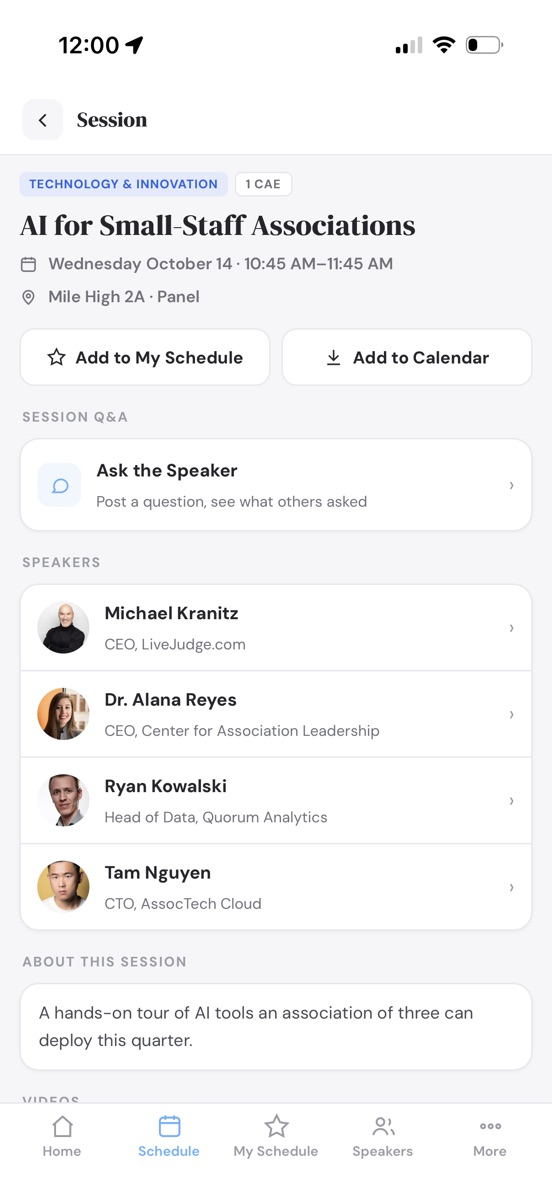
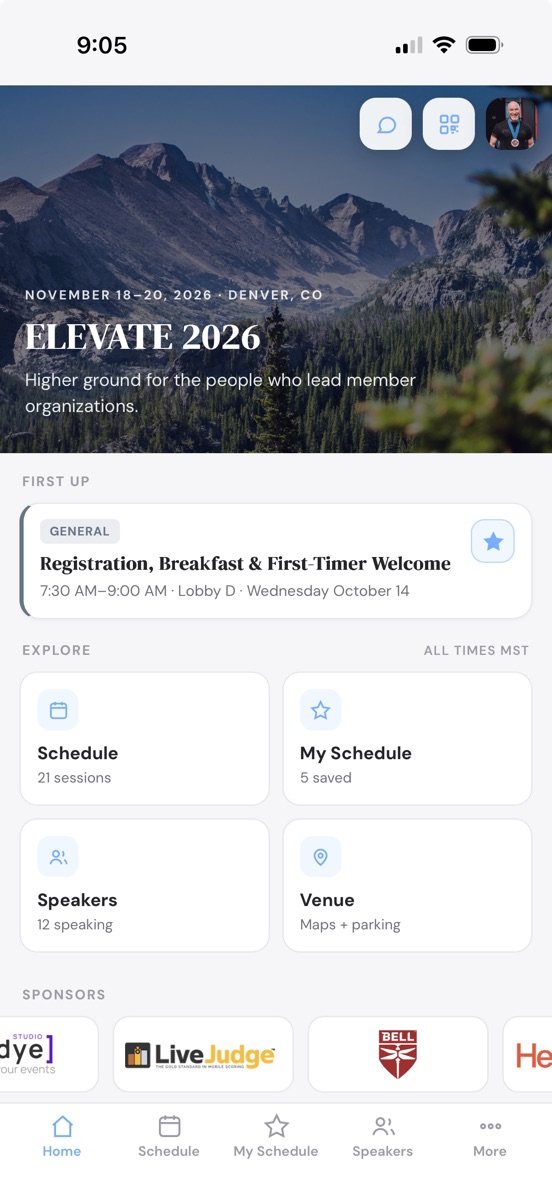
AI-enabled WDYE Studio builds your event's entire website and event app: agenda, speakers, sponsors, hotels, live Q&A, attendee messaging, QR contact scanning, paid registration and more. 4x faster. 1/4 the price.
Full builder access. No credit card until you go live.
Everything You Need to Run Your Event
Built for Organizers, Not Webmasters
One studio runs the whole event: the public site, registration and payments, printed badges, the attendee app, the exhibit floor, and the people who make it happen.
A Site That Publishes Itself
Every section is a form you fill in - agenda, speakers, sponsors, venue, FAQ - and the live site on your own address updates the moment you save.
Registration & Payments
A real box office: registrant types, tickets, merchandise, coupons and early-bird pricing, with cards settling straight into your own Stripe account.
Printed Badges & Check-In
Design a 4×3 badge once, preview it on real attendees, and print the whole room on Avery stock. QR tickets check people in at the door.
A No-Download Attendee App
Schedule, personal agendas, speakers, maps and announcements on every phone from a QR code - no app store, no install.
Exhibit Floor Sales
Draw the hall to scale and booths sell themselves at registration on a live map, with exhibitor portals and worker passes included.
Speakers & Sponsors Serve Themselves
Invite links and open applications bring in headshots, bios, sessions and logos without retyping. You just approve.
Engagement On Site
Live polls, session Q&A and feedback, attendee networking with QR contact swaps, and push bulletins that reach the whole room in a minute.
AI Drafts the Busywork
Drop in a spreadsheet or describe your program: the agenda, the registration form, even the exhibit floor arrive as drafts you nudge into place.
Your Brand, Your Team, Your Rules
Fonts, palettes and hero styles, per-person permissions, private password-protected review, and attendee support tickets with your name on them.
The Event Website
Conference-Grade Power, Built Like a Document
A multi-day agenda with tracks, rooms and credits. Speaker and sponsor walls, venue and hotels, FAQ and search. Every one of them is a form you fill in, never a page you design, and the whole site restyles itself around your logo and your palette.

Drag-and-Drop Agenda
Build the program on a real calendar. Drag a session onto a day, drag its bottom edge to change how long it runs, and everything snaps to the quarter hour. Room and speaker double-bookings flag themselves in amber before anyone else sees them.
Sessions That Carry Everything
Tracks, rooms, credit types, speakers, tags, documents and videos ride on every session, and your visitors filter the whole program by any of them.
Speakers and Sponsors, Presented Properly
Keynote badges, headshot grids, bios and links, plus sponsor tiers with a logo for light backgrounds and one for dark. Both walls build themselves from the roster you already keep.
Keep Only the Sections You Need
Venue, hotels, sponsors, videos, documents, FAQ, and blocks of your own. Mark the rest not applicable and reorder the whole page by dragging.
Built to Be Found
Your own titles, descriptions and social cards, a sitemap that maintains itself, and a robots policy that keeps an unpublished site out of Google until you are ready.
Private Review, Then Live
Share a password-protected preview with your board or your client. Flip to Live only when every required section is complete, and the password gate disappears.


Included with every plan, starting at Website.Your site publishes to a branded URL the moment you flip it live. Change it at will.
Speakers & Sponsors
They Fill In Their Own Details
Send one link. Speakers write their own bios, crop their own headshots and propose their own sessions; sponsors submit their own logos, blurbs and booth numbers. You approve with a click and the site updates itself. Nobody gets an account for you to manage.
One Link, No Accounts
Invite by email and each person gets their own private link. Coming back later takes a two-word code emailed on request, so there is no password for them to lose or for you to reset.
Open Calls, On Your Terms
Turn on speaker applications, sponsor applications, or both, and anyone can propose a session or submit their company. Turn them off and the door closes without touching what already came in.
Headshots That Fit the Grid
They crop their own photo in the browser to the shape your site uses, so the speaker wall lines up without a designer ever opening it.
Approve, Decline, Reconsider
Submissions wait in your queue. Approve and they publish; decline and the record stays with a quiet "not selected" note, so nothing is lost and nobody is emailed by accident.
Sponsors Maintain Their Own Listing
Logos for light and dark backgrounds, website, blurb, booth number and a point of contact, all kept current by the sponsor, inside the tiers you define.
It Lands on the Site Instantly
An approved speaker appears on the speaker wall and on every session they are attached to, in the event app too, with nothing re-typed on your side.


Self-service editing and open applications come with every plan. Emailed intake invitations are part of Web/Mobile and above.
The Attendee App
An Event App You Can Launch in Under Five Minutes
Your agenda, speakers, sponsors, and venue are already in the builder. Turning the app on reuses every one of them, so there is nothing to rebuild, nothing to submit to an app store, and nothing for your attendees to install.
Live Bulletins, Straight to the Lock Screen
Room change, weather delay, keynote running late. Post it once and it pushes to every attendee's phone, even with the app closed.
Speaker Q&A You Control
Attendees ask from their seat. Questions land in a private bullpen where your moderators publish the good ones and mark them answered, or you let them post straight through.
Attendees Message Each Other, Privately
An opt-in directory of who else is in the room, searchable by name, company or industry. Start a conversation and it lands on their phone as a notification. No mobile number and no email address changes hands to do it.
A Personal Agenda in One Tap
Star the sessions that matter to build My Schedule, then drop the whole thing into Apple or Google Calendar at once.
The Whole Program in Their Pocket
Multi-day agenda with tracks, rooms, and credits, plus speaker bios, venue maps, hotels, resources, and FAQ. It caches itself, so a packed ballroom with weak wifi still opens the schedule.
Your Icon on Their Home Screen
Choose the artwork, the backdrop color, and the label. Attendees scan a QR code and add it in two taps. No app store review, no download, no update to chase.
Sponsors Get Real Estate
Logos ride along on the app home screen and on their own page, which gives you inventory to sell that your last event did not have.
Included with Web/Mobile and above. The app publishes to your own address at yourevent.wdyehost.com/app and updates the moment you edit the site.
QR Contact Scanning
Every Badge Is a Business Card
100% opt-in lead scanning. Attendees create their own digital QR badges in seconds right in the event app. No lanyard printers, no lead-retrieval rental units.
Digital Badges, Zero Setup
Nobody is preloaded and there is no attendee-data upload, so there is nothing to opt anyone into. Each attendee creates their own card: name, company, industry, and a note that travels with every scan.
Scan to Swap
The in-app scanner reads a badge and saves the card on the spot. No app on the other phone? A plain camera scan of the badge opens the same flow.
A Lead List That Leaves With Them
Searchable all week, then out the door as CSV or Excel sorted by last name, or shared anywhere with the phone's own share sheet.
Call, Text, or Email in One Tap
Every saved card opens straight into the phone's dialer, messages, or mail. Follow up from the hallway, not from a spreadsheet next Tuesday.
Built for Terrible Conference Wi-Fi
Nothing to download and requests light enough to squeeze through a crawling venue network. The app itself caches, so screens stay up while the room's bandwidth dies.
Charge for It If You Like
Set an access code in the studio and registration requires it. Hand it to paid attendees, print it on a badge tier, or sell it at the booth.
 Saved Jordan Kim · Summit MediaAlex RiveraNorthline Group
Included with Web/Mobile and above, inside the same no-download app. Each attendee's list is their own; organizers never harvest it.
Live Session Polls
Ask the Room, Watch It Answer
Build a poll once, then run it on as many sessions as you like. Every session keeps its own ballot box, so the same question asked in two rooms creates two sets of results.
Create Once, Run It Anywhere
Write the question one time and attach it to any number of sessions. Each session collects its own votes, so Tuesday's room never blurs into Wednesday's, and you can compare the two.
Four Ways to Ask
One choice, pick-your-top-three, full rank order, or a 1 to 5 star rating. The right shape for "which topic wins" is not the right shape for "how did we do," so you get both.
Results the Second They Vote
The card flips to animated live results with their own pick tagged. Nobody sees the numbers before voting, and a per-poll switch can hide results from voters entirely, keeping the data yours alone.
One Ballot Per Phone
Each device gets one vote per poll, per session. Tap again and it simply shows the results, so a refresh never stuffs the box.
Open and Close From the Studio
Close voting when the speaker moves on. The poll stays on the session page showing final results, and you can reopen it anytime.
No Clickers to Rent
Polls live inside the same no-download event app as the agenda and Q&A. Requests are light enough for a packed ballroom on struggling wifi.
Included with Web/Mobile and above. Build the poll in the studio, assign it to sessions, and it is on every phone in the room.
Attendee Registration
Sell Every Seat From Your Own Site
The Full Suite adds a real box office to your event site: registrant types you define, a cart-style form your attendees already know how to use, card checkout, QR tickets and door check-in. No per-ticket platform fee, ever.
Registrant Types You Define
Attendee, VIP, member, press: each type carries its own price, its own items, and its own questions. Invite-only types hide behind single-use codes, a shared passcode, or a magic link you email out.
A Form That Sells Like a Store
Tickets, sessions straight from your agenda, merchandise with sizes and quantities, and categories you invent. A live order summary keeps the total honest while they pick.
Rules, Coupons & Early-Bird Prices
Reveal a question, show an item, or grant a discount based on an answer. Coupons cap their own uses, and prices can step up automatically on a date you set.
Cards Straight Into Your Stripe
Checkout charges the attendee's card directly into your own Stripe account. Your money never sits in ours, and you can pass the processing cost through at checkout.
QR Tickets & Door Check-In
Every registration emails a QR ticket. At the door, volunteers with a passcode check people in by name or camera scan on their own phones. No hardware to rent.
Orders, Reports & Refunds
Watch orders land live, print the report library (rosters, item summaries, revenue), build custom CSV or Excel exports, and refund with a click when plans change.

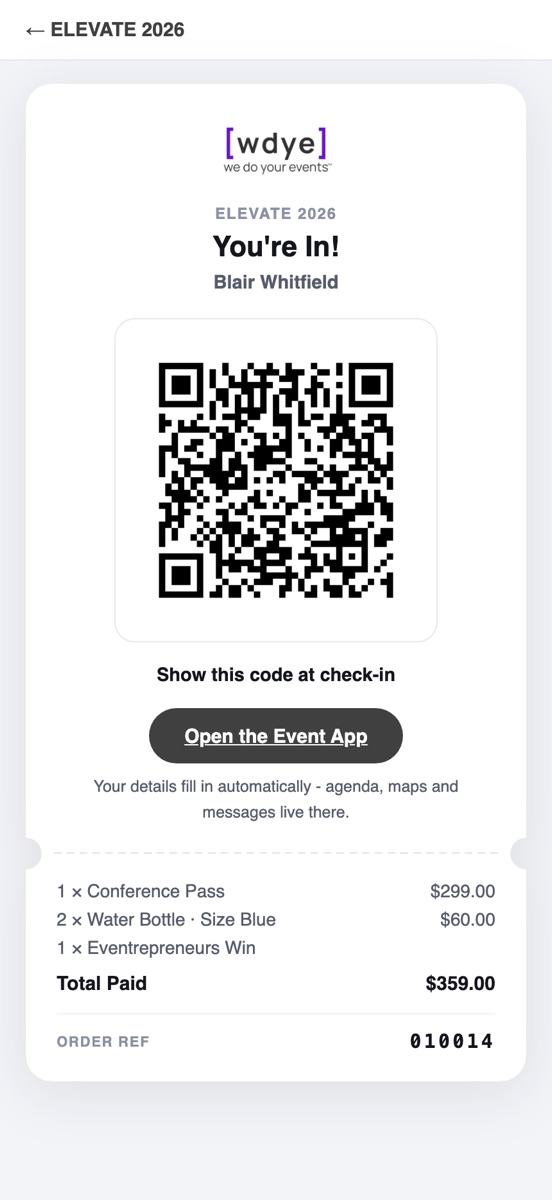
Included with Full Suite. Payments settle in your own Stripe account, and a signed test link rehearses the whole flow before you go live.
Printed Badges
Design & Print Badges
Design One Badge, Print the Whole Room. Our simple, modern badge designer lets you create clean, professional-looking badges that you can print six-up on standard Avery stock.
A Designer, Not a Template
Name and company fields, your own text, images, color blocks and a QR code, dragged anywhere on the badge. Fonts, sizes, all-caps, layers and snap-to-grid included, horizontal or vertical.
Previewed on Real Attendees
The canvas shows your actual registrations, one by one, before anything prints. Long names reveal themselves on screen, not at the check-in table.
The QR That Works the Room
Every badge carries the attendee's own scannable code. One scan in the event app swaps contact cards, so the badge is a business card too.


Avery Stock, Six to a Sheet
Print everyone, one registrant type, or a hand-picked few onto standard letter badge sheets. No cutting, no mail merge, no design software.
Lined Up on Your Printer
A live preview of the sheet shows exactly where each badge lands, and two nudge controls dial in any printer's alignment once, remembered forever.
Included with Full Suite, right beside registration - the roster you sold is the roster you print.
Exhibitor & Booth Sales
Sell the Exhibit Floor Straight From the Map
Draw your hall once, in real feet, and the floor sells itself: exhibitors pick their booth on a live map while they register, pay in the same checkout, and get a portal to run their own listing and booth crew.


A Floor Plan, Not a Spreadsheet
Booths, aisles, the stage and the food court, all drawn to scale in feet. Stamp whole numbered rows in one drag, renumber a block at once, and trace over a photo of your venue's real floor plan.
AI Drafts the First Pass
Describe last year's layout in a sentence or two and a draft floor appears on the canvas, ready to nudge. Zones split a big hall into tabs so the map stays usable on a phone.
Premium Rows for Premium Buyers
Categories color the map and carry default price, size and worker passes. Limit who may buy a category and the wrong buyers never even see those booths.
Booths Sell Themselves at Registration
Switch a registrant type on and its form gains a live Choose Your Booth step. A tapped booth holds for 15 minutes while they pay, so two buyers never land on the same space.
Exhibitors Run Their Own Listing
Every booth sale emails a private portal link. The exhibitor writes their own blurb, uploads light and dark logos, and lands on your site's floor map and directory without you retyping a thing.
Worker Passes That Register Themselves
Each booth includes free crew passes. The exhibitor shares one code, workers register on it, extras charge automatically, and your check-in roster fills itself.
Included with Full Suite. Booth revenue checks out through the same registration cart, straight into your own Stripe account.
How It Works
Three Steps to a Live Event Site and App
No kickoff call, no scoping document, no agency queue. You start on step one the minute you sign up, and nothing you build expires while you decide.
Build
Fill in the sections that matter, choose your event's own address (yourevent.wdyehost.com) right inside the builder, and invite speakers & sponsors to submit their own details.
Review
Preview the real site as you work. Share a password-protected link with your board, your client, or your committee for sign-off.
Go Live
When required sections are complete, one click publishes to the world. This is the only moment we ask for payment.
Pricing
Try Everything Free. Pay When You Publish.
Every plan includes the full builder, private review links, and hosting with SSL on your wdyehost.com address. Event credits never expire, and multi-event packs save more.
Taste the full power of the system all the way to preview. When you are ready to go live, upgrade to your favorite plan.
- Full builder, every section
- Try intake, team logins & the AI Assistant
- Rehearse registration with test orders
- Password-protected review site
- A sample event to start from
- Unlimited private previews
- Your address reserved from day one
- Nothing expires while you decide
- No credit card required
- Going live requires a plan
One event site, live to the world for its full run, on your own address with SSL. Packages of 3, 5 or 10 are discounted.
- The complete website, published
- Agenda, speakers, sponsors, hotels
- Unlimited speakers, sessions & sponsors
- Site layout, SEO & social sharing
- Attendee question form & support inbox
- Your subdomain + SSL included
- Up to 10 team logins
- Email support
Everything in Website, plus the no-download attendee app: bulletins, speaker Q&A, live polls, private attendee messaging and QR contact scanning. Packages of 3, 5 or 10 are discounted.
- No-Download Event App
- Live bulletins with push notifications
- Speaker Q&A with moderators
- Live polling by session
- Session feedback & ratings
- Attendee directory & messaging
- QR Contact Scanning
- Speaker & sponsor intake portal
- AI Agenda Assistant
Everything in Web/Mobile, plus full attendee registration: booths, tickets, sessions and add-ons, coupons, invite codes, check-in and reports, with payments straight to your own Stripe.
- Everything in Web/Mobile
- Attendee registration & checkout
- Sell tickets, sessions & add-ons
- Exhibitor booth registration
- Rules, coupons & invite codes
- Payments straight to your Stripe
- QR tickets & door check-in
- Orders, reports & refunds
Payments handled securely by Stripe. Event credits are spent when a site goes live and never expire.
Questions
Fair Asks
What happens when my trial event is ready to launch?
Nothing expires and nothing is deleted. Your site stays in private review until you buy an event credit (Website, Web/Mobile, or Full Suite). Then the Go Live button unlocks and your site is public within seconds.
Do I need my own hosting or domain?
No. Every site gets a fast, SSL-secured address like yourevent.wdyehost.com the moment you create it. Hosting is included in every plan.
Can my team help without breaking things?
Yes. Invite a teammate on your free trial to see how it works, then invite your whole team on any paid plan: every paid event gets up to 10 logins. Grant access section by section, so a volunteer can edit the FAQ without ever touching your branding or your launch controls.
How do speakers and sponsors get involved?
Send personal invite links or turn on open applications. They submit their own photos, bios, and materials through a guided portal, and nothing appears on your site until you approve it. Try it free on your trial; unlock unlimited invites with Web/Mobile or above.
Can I sell tickets and take payments?
Yes. The Full Suite adds attendee registration to your site: define registrant types, sell tickets, agenda sessions, merchandise and add-ons, and take cards at checkout. Payments land directly in your own Stripe account with no per-ticket platform fee, and every registration emails a QR ticket that works with the built-in door check-in. Build it all and place test orders free before you upgrade.
What's an event credit?
One credit takes one event live for its entire run. Buy them singly or in discounted 3-, 5-, and 10-packs; they sit on your account and never expire.